
Review tool changes
When a refresh finds that a tool’s definition changed, Aethis pauses execution through that Connection until someone reviews it. This guide covers the review. For why it works this way, see Tool discovery and review.
Before you begin
Section titled “Before you begin”Confirm the expected server release or configuration change with the team that owns the MCP server. The review applies to every pending change in the Connection, so do not accept based on one familiar tool while another changed unexpectedly.
How you’ll know
Section titled “How you’ll know”- The Connection’s status is Review changes, and its overview says “Tool changes are paused until the catalogue is reviewed.”
- On assigned Agents, the Connection shows Frozen and its tools show Unresolved with “Connection is paused”.
- A Capability Drift alert opens in Alerts.
Review the catalogue
Section titled “Review the catalogue”-
Open the Connection (from Connections, or Review changes on the alert) and select Review changes. The Tools section opens.
-
Select Needs review to list only the tools that changed. Changed tools are marked with !.
-
Select a tool. Compare Previously accepted with New definition, and check its Parameters.
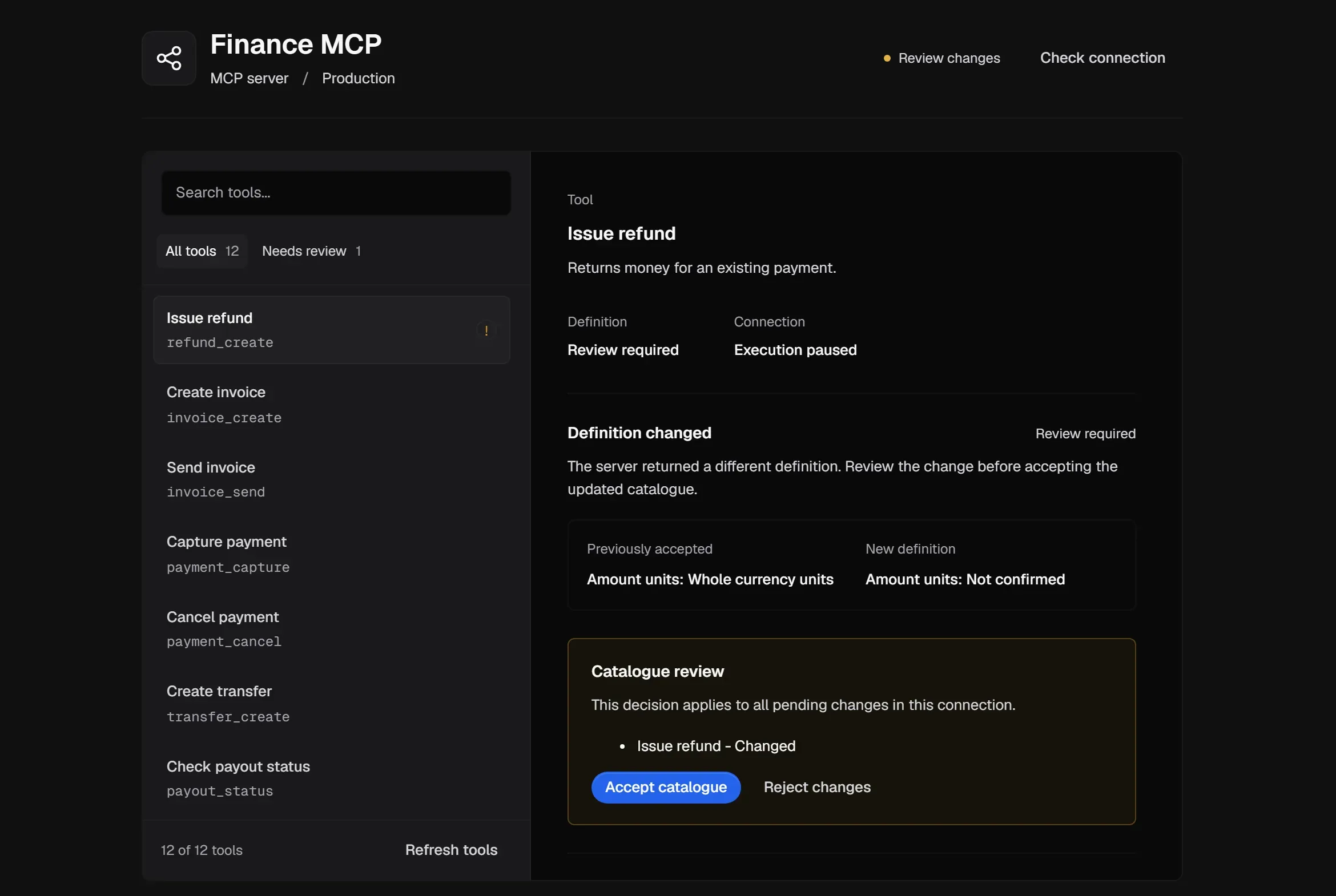
-
Decide under Catalogue review. The decision applies to all pending changes in this Connection:
- Accept catalogue if every change is expected and safe. The Connection returns to Governed.
- Reject changes if anything is unexpected. The Connection stays Frozen. Fix the server, select Refresh tools, and review again.
Expected result: after Accept catalogue, the accepted capability fingerprints match the reviewed definitions and the Connection returns to Governed. After Reject changes, it remains Frozen until the upstream server is corrected and a later refresh produces a catalogue you accept.
Review tool meaning
Section titled “Review tool meaning”A Connection can show Review tool meaning even when its catalogue is current. This means some tools still need their effect or amount format confirmed before policy can evaluate them. Open the Connection’s Tools, check the flagged tools, and confirm their meaning.
If the Connection stays Review changes, look for another pending tool in the same catalogue. If it becomes Review tool meaning, the definitions are current but a semantic detail such as effect, amount unit or currency still prevents reliable evaluation. If it is Unavailable, test reachability with Check connection instead of repeatedly accepting the catalogue.
Close the alert
Section titled “Close the alert”Acknowledging a Capability Drift alert doesn’t resume execution. After you accept or reject the catalogue, open the alert and resolve it. See Respond to Alerts.